 Close the form.
The following buttons are available in the command bars of the Layout and Info tabs:
Close the form.
 Remove current structure from the library.
 Commit form data to the database.
 ,
,  ,
,  Add a new one-, two-, or three-phase
circuit.
Add a new one-, two-, or three-phase
circuit.
 Add a new ground wire.
 Set the maximum drawing range of the diagram.
 Generate a line constants report for the all the circuits in the structure. The
following dialog box will appear.
Generate a line constants report for the all the circuits in the structure. The
following dialog box will appear.
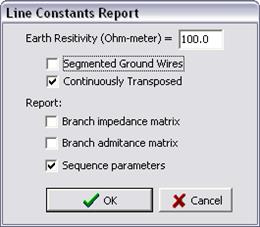
See Section 2.5 GLOSSARY for definition of segmented ground wire and continuous transposition. Select the options and press OK. The report will appear in the TTY Form.
Note: The “Continuously Transposed” option will have no effect on the sequence parameters. The reason is that the sequence networks are balanced by definition. Hence the program logic always makes continuous-transposition assumption when computing the sequence parameters.
 Customize Info fields. Administrator can use this command to enable/disable the
info fields, customize the field label, specify field display order on the form,
and define dropdown pick list for text fields. See Section 3.16 CUSTOMIZABLE DATA FIELDS for more
information.
Customize Info fields. Administrator can use this command to enable/disable the
info fields, customize the field label, specify field display order on the form,
and define dropdown pick list for text fields. See Section 3.16 CUSTOMIZABLE DATA FIELDS for more
information.