Each copy of the Desktop Version you licensed allows you to install the Line Database Desktop Version software on one computer. The Software Licensing Agreement for the Desktop Version requires you to install the executable file and all the database files to your local hard drives.
1. Insert the program CD into your CD-ROM drive.
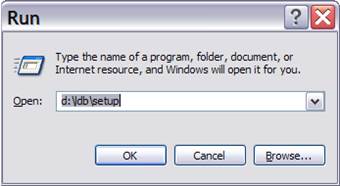
2. The setup program will start automatically. (If not, on your Windows desktop, click on Start, then on Run. The following dialog box will appear.
Enter D:\LDB\SETUP in the edit box, where D: is the name of your CD-ROM drive. Press OK. The installation program will start.)
3. Follow the instructions on the screen.
The setup program will ask you for a company name and a company code. You can find the company name and code in the letter that accompanied the initial shipment of the program CD. Please write to support@aspeninc.com if you need any assistance.
The setup program will create a program directory (the default is C:\Program Files\ASPEN\LineDBV3) and copy the following files there.
Linedb.exe The Line Database executable file.
Lcdll08.dll The line constants calculation library.
LDBUtilV3.exe The Line Database utility program.
Manldb.chm The Line Database help file.
Install.log A log file from the setup program. Do not erase.
Demo Folder with program demo.
The setup program will create a data directory (the default is <My Documents>\ASPEN\LineDBV3) and copy the following .ald files there.
Sample_English60.ald A sample database for 60 Hz and English units of length.
Sample_Metric60.ald A sample database for 60 Hz and metric units of length.
Empty.ald An empty starter database with no wire data.
Empty_English60.ald A starter database for 60 Hz and English units of length. This database is empty except for approximately 650 commonly used wire types (See APPENDIX A: WIRE TYPE DATA).
Empty_Metric60.ald A starter database for 60 Hz and metric units of length. This database is empty except for approximately 650 commonly used wire types (See APPENDIX A: WIRE TYPE DATA).
The setup program stores the database files in a separate data directory because under Windows 7 (and most probably, in future versions of Windows), users do not have write privileges for files in the c:\Program Files directory.
The setup program will create a Windows program group called "ASPEN Line Database v3" under Windows desktop’s Start | All Programs | ASPEN menu.
4. If your program comes with a program key, plug the key onto a USB port of your PC.
5. If you are installing the Line Database for the very first time, please see APPENDIX E: GETTING STARTED NOTES.