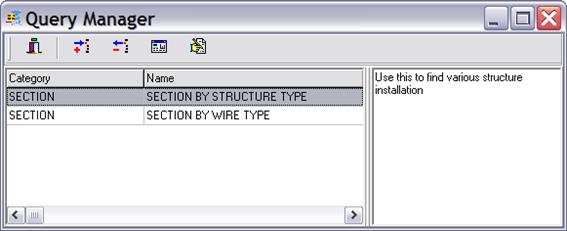
The File | Query Manager command lets you store, remove and modify stored queries. These queries will be displayed in the main window’s Query menu for quick access.
TO RUN THE QUERY MANAGER
1. Select menu Query | Query Manager. The Query manager dialog box will appear.
TO STORE A NEW QUERY
1.
Click on Add button  to store a
new query. The File Open dialog box will appear. Use the dialog controls to
select and open query file (.ASQ). The Store query dialog will appear.
to store a
new query. The File Open dialog box will appear. Use the dialog controls to
select and open query file (.ASQ). The Store query dialog will appear.
2. Enter stored query Name, Category and Description. Press OK when done.
TO REMOVE A STORED QUERY
1. Select query in the list.
2.
Click on Delete button  .
.
TO MODIFY A STORED QUERY
1. Select query in the list.
2.
Click on Design button  . The
Query wizard screen will appear to let you update the query criteria and
parameters.
. The
Query wizard screen will appear to let you update the query criteria and
parameters.
TO RENAME A STORED QUERY
1. Select query in the list.
2.
Click on Rename button  . A
dialog box will appear to let you modify query name, category and
description,
. A
dialog box will appear to let you modify query name, category and
description,
Main Window