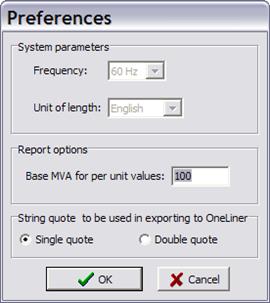
The Tools | Preferences command displays the current system settings. You can change the system base MVA and output options.
TO EXPORT SPECIFY PROGRAM DEFAULT VALUES:
1. Select the Tools | Preferences command. Following dialog will.
2. Enter following preferences.
Enter frequency: Power system frequency in Hz.
Enter unit of length: Select English or Metric unit of length.
Note: The measurement unit and the power frequency were specified when the library was created. Once entered, they cannot be modified.
Enter Base MVA for per unit values: Default is 100MVA.
Enter Quote character to be used in data export. Single quote or double quote can be selected.
3. Press OK button to save your preferences.
Main Window
TOOLS MENU