The ASPEN Line Database is available in two versions: Line Database Desktop and Line Database Enterprise.
Desktop Version
The Line Database Desktop is designed to work on a single computer. At any time, only one person can access the database. The executable files and data files of the Line Database Desktop must be installed on the computer’s local drives.
Enterprise Version
The Line Database Enterprise can be installed on multiple computers in a company’s network to allow multi-user access to a common database. The user must enter a login name and a password to gain access to data. The Administrator can assign different privileges to different users.
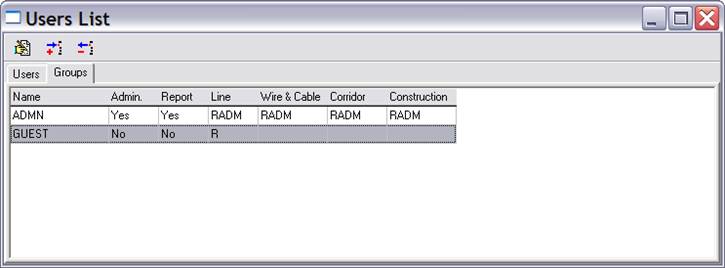
The following form shows a sample installation with just two groups of users: ADMIN and GUEST. The ADMIN group has full access rights (‘R’ for read, ‘A’ for add, ‘D’ for delete, and ‘M’ for modify) for all the forms. The GUEST group, on the other hand, has read-only privilege on the Line data form. (Blank means no access privilege.)
Once the access groups are setup, the Administrator can create a user account by entering the user name and group affiliation on the Users tab of this form.