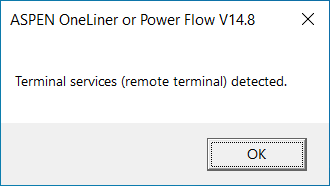
This error message indicates that: 1) OneLiner configuration for Key Type and Method of Access on this PC is set to "Local access to Hasp HL-max or HL-Net key". And 2) The program is being launched in a windows remote desktop session.
OneLiner program does not work in this configuration by design. To run OneLiner in a windows remote desktop session, you must use a Hasp HL-Net key or a software SL key and set up the OneLiner configuration accordingly. Additional details about network key access can be found in Section 2 of the OneLiner Getting Started manual.
If you must use the ASPEN OneLiner program remotely and you only have HL-Max key(s), you can contact ASPEN Support with a request to exchange it for an HL-Net or SL key having an equivalent number of OneLiner seats.