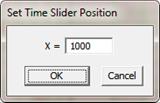
This Set Time Difference Slider X-position command will let you specify desired position of the time difference slider on the X-axis.
TO SET TIME DIFFERENCE SLIDER X-POSITION:
1. Right click the mouse on the time difference slider you want to position. Select Set Time Difference Slider X-position in the pop-up menu.
The Set Time Slider Position dialog box will appear
2. Enter desired X coordinate of the time difference slider.
4. Click OK to place the time difference slider at the desired location.